Set your price
Charge per question or make your dataset free, choose what agents see before they pay, and change your price later.
You set the price in the dataset's Settings, under Pricing, and can change it as often as you like while the dataset is a draft. During the beta, amounts are in test USDC: see Get paid.
Charge per question
Keep Per question selected and enter your Price per question in USDC. The buttons under the field fill in $0.001, $0.01, $0.10, or $1.00, and the line below turns your price into a total per 1,000 questions. The maximum is 10,000 USDC. Click Save pricing.
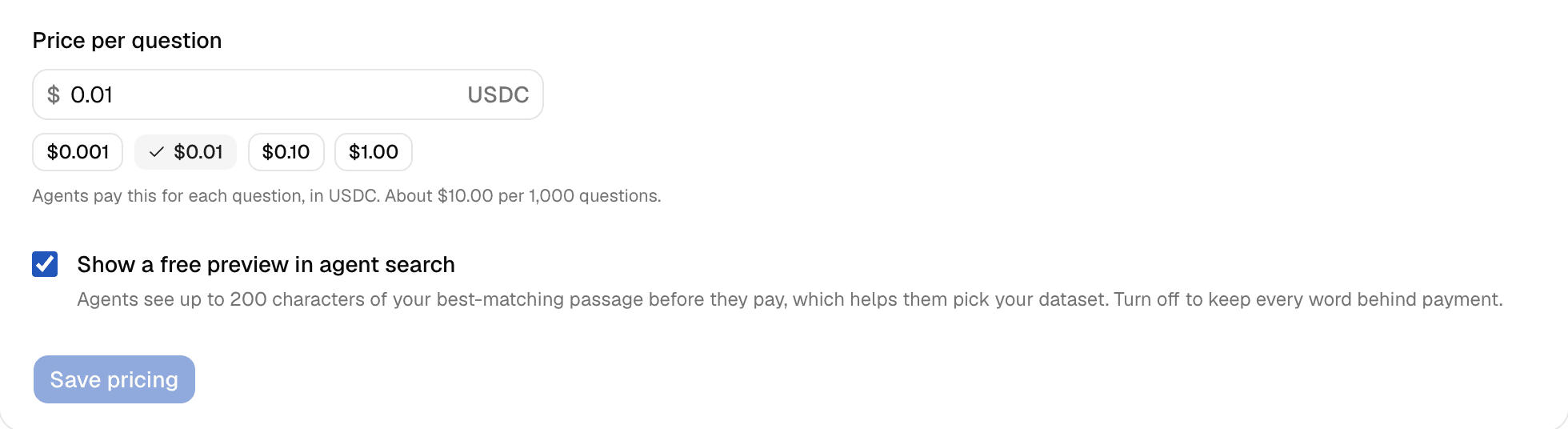
An agent pays the same price whether it takes five passages or twenty, and it pays for every question that gets an answer, even when the passages fit poorly. The whole price goes to your wallet: see Get paid.
How to pick a price
quarry starts every dataset at $0.01, but that isn't advice, and there's no right answer yet. A few questions help:
- What would a buyer pay to get this answer another way, by buying your report, subscribing to your data, or asking an analyst?
- How many questions would an agent need to get what it wants from your files? A low price per question adds up fast when an agent asks twenty.
- Can a buyer find this anywhere else? Data that's hard to get is worth more to them.
- What would copying cost? An agent gets at most 20 passages per question, and your public page shows how many passages you have. At $0.01, reading through 2,000 passages costs at least $1. The terms forbid rebuilding a dataset, but your price is what makes it expensive.
You can start with a price, watch what agents ask on the Analytics tab, and adjust it later.
Make your dataset free
Set the price to 0. The field then reads "Free: agents pay nothing to ask." Agents get passages without paying or needing a wallet, and quarry limits how fast any one agent can ask. Free answers count in "Questions answered" on your public page, but never as revenue. You still need your wallet to be ready to publish.
Free preview in search
When an agent searches quarry, the top five results can each show a free preview: up to 200 characters of the passage that best matches its question, with the file name and page. It helps agents pick your dataset.
Previews are on for new datasets. To keep every word behind payment, uncheck Show a free preview in agent search under Pricing. This is the one setting you can change while the dataset is live.
Change your price later
A live dataset is locked, so to change its price:
- In Settings, click Unpublish, then confirm.
- Change the price under Pricing and click Save pricing.
- Click Publish again.
Your dataset keeps its address, its history, and its sales. While it's unpublished, agents can't find it or pay to ask it questions.
Monthly subscriptions
Not open yet
Monthly subscriptions aren't open on quarry yet: the option shows in Settings but can't be selected. This part describes how it will work. Today, you can charge per question or make your dataset free.
With a monthly subscription, a buyer pays a fixed price each month for a set number of questions, shared by all their agents. Buyers pay by card through Stripe, and Stripe pays you out to your bank.
To offer one, you'll first connect Stripe: open Subscriptions, then Selling, pick your Business country, click Connect Stripe, and finish the setup on Stripe's site. Back on quarry, Open Stripe setup resumes it and Check status confirms it's done. The Stripe account card shows quarry's commission on subscriptions; Stripe's own card fees apply too.
Then, in the dataset's Pricing, choose Monthly subscription, or Both to keep the price per question as well, and fill in:
- Monthly price, from $0.50 to $10,000;
- Questions per month, from 1 to 10,000,000;
- Usage terms: how buyers may use the passages, such as internal use only. The terms already forbid reselling passages and republishing them in bulk.
Changes to an offer apply to new subscribers. Existing subscribers keep the price, number of questions, and terms they signed up for.